Staying Connected Is Easier Than Ever
Let’s be honest, getting a little lost in a new city can be part of the thrill. Wandering streets in Rome or stumbling upon a hidden street food gem in Bangkok? Magical. But going completely off the grid with no way to check in? Not so much. Traveling is one of life’s most exciting adventures from the colorful buzz of a Thai night market to the peaceful stillness of Canada’s vast national parks, and the cozy charm of a corner café in Paris. But while soaking in every moment, it’s just as important to stay connected. Whether you’re keeping your family in the loop, finding your way with travel buddies, or organizing a last-minute meet-up with new friends abroad, knowing how to share location on iPhone while traveling makes everything easier and a lot less stressful. That’s where Aerobile eSIM comes in! A reliable travel buddy trusted by thousands of explorers from the U.S. and Canada. As someone who’s relied on Aerobile during my backpacking trip through Asia, I can tell you firsthand: having fast, dependable data and smooth location sharing is a total game-changer.
In this quick and easy guide, we’ll walk you through iPhone location sharing settings step-by-step and show you how Aerobile helps you stay online, connected, and safe, no matter where your journey takes you.
Why Sharing Your Location Matters While Traveling

When you’re thousands of miles away from home, sharing your iPhone location while traveling isn’t just a convenience but a total game-changer! As someone who’s navigated everything from buzzing city streets in Tokyo to solo hikes in the Swiss Alps, knowing you can quickly share your location offers peace of mind like nothing else. Staying connected with your travel buddies is easier than ever! I personally love using the Find My app as it’s super intuitive and helps my friends locate me instantly, especially when we’re trying to meet up in a busy crowd.
And let’s not forget about your family back home. Just a quick check on your location can reassure them that you’re safe and sound even if you’re off the grid in a different time zone. Plus, if you’re hopping between events or festival spots, being able to coordinate in real time can save hours of “Where are you?” texts.
So, if you’ve ever wondered how to share location on iPhone while traveling, this simple setting could completely upgrade your travel experience that making every trip smoother, safer, and more connected.
How Aerobile eSIM Makes iPhone Location Sharing Seamless
Before we dive into the techy part of how to share location iPhone while traveling, let me quickly share why Aerobile has become my go-to travel essential especially when I’m exploring new countries with my iPhone in hand. Think of it as your digital travel buddy, one that saves you time, money, and a lot of hassle. Here’s why Aerobile is a total game changer for iPhone users abroad:
-
 Instant Activation – No more fumbling with physical SIM cards or wasting precious vacation time. Aerobile’s eSIM gets you connected in just minutes.
 -
 Global Coverage – Whether you’re sipping coffee in Paris, hiking in Peru, or temple-hopping in Cambodia, you’ll stay connected almost anywhere.
 -
 Affordable Plans – Tailored for North American travelers, so you’re not paying sky-high roaming fees.
 -
 Safe & Secure – Enjoy peace of mind with encrypted connections even when you’re using sketchy airport or café Wi-Fi.
client testimonial
I strongly recommand sim2roam / Aerobile products, their client service is exceptionnal, and this is rare and very necessary when you buy telephone cards or esim or any digital product, you will need help at some point. I have already bought a physical telephone card for the USA, and then again an esim a few months later and each time the client service was quick to answer, and very helpful, plus they are very kind. You can buy with them “les yeux fermés” as we say in France, closing your eyes, with no worries.
[Step-by-Step Guide] How to Share Location on iPhone While Traveling
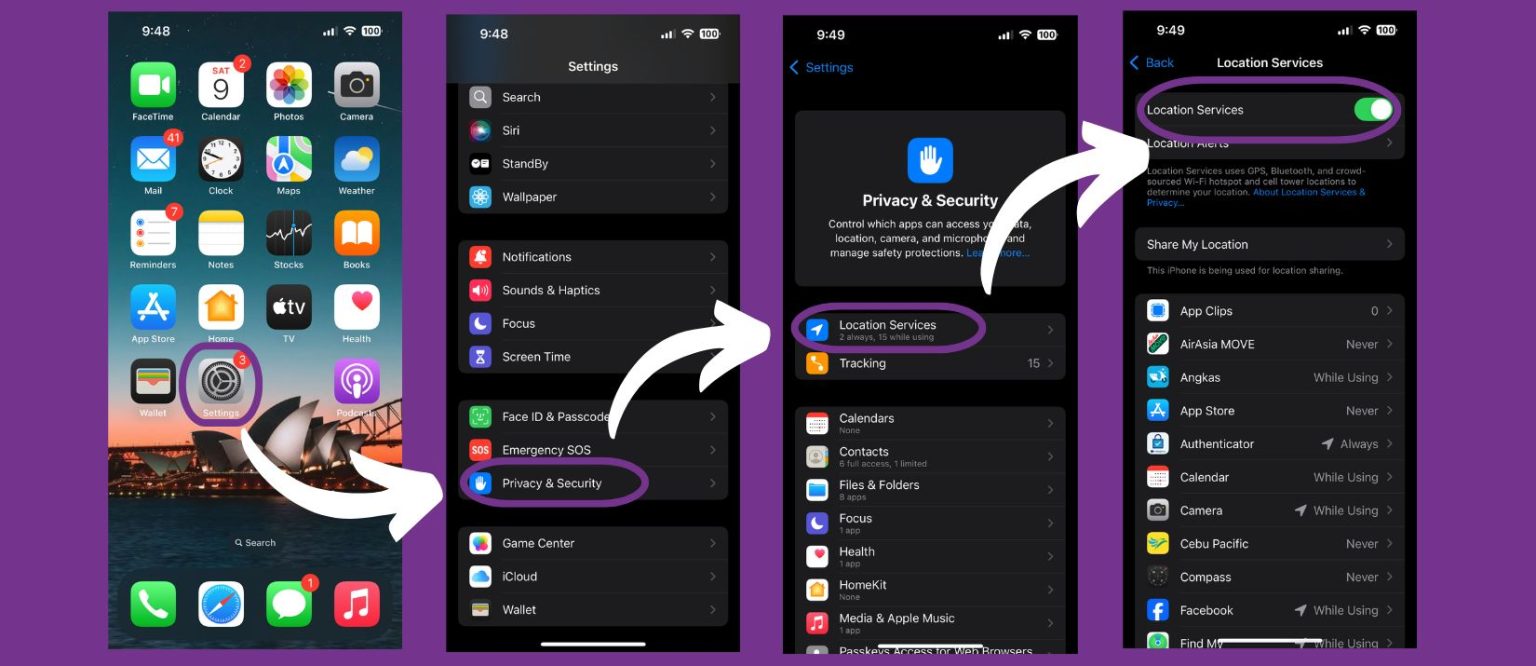
1. Enable Location Services
(iPhone Location Sharing Settings Basics)
>Go to: Settings > Privacy & Security > Location Services
>Toggle it On
Pro Tip: This must be enabled for any other location sharing to work.
2. Use the Find My App for Real-Time Tracking
(Best for: family, close friends, long trips)
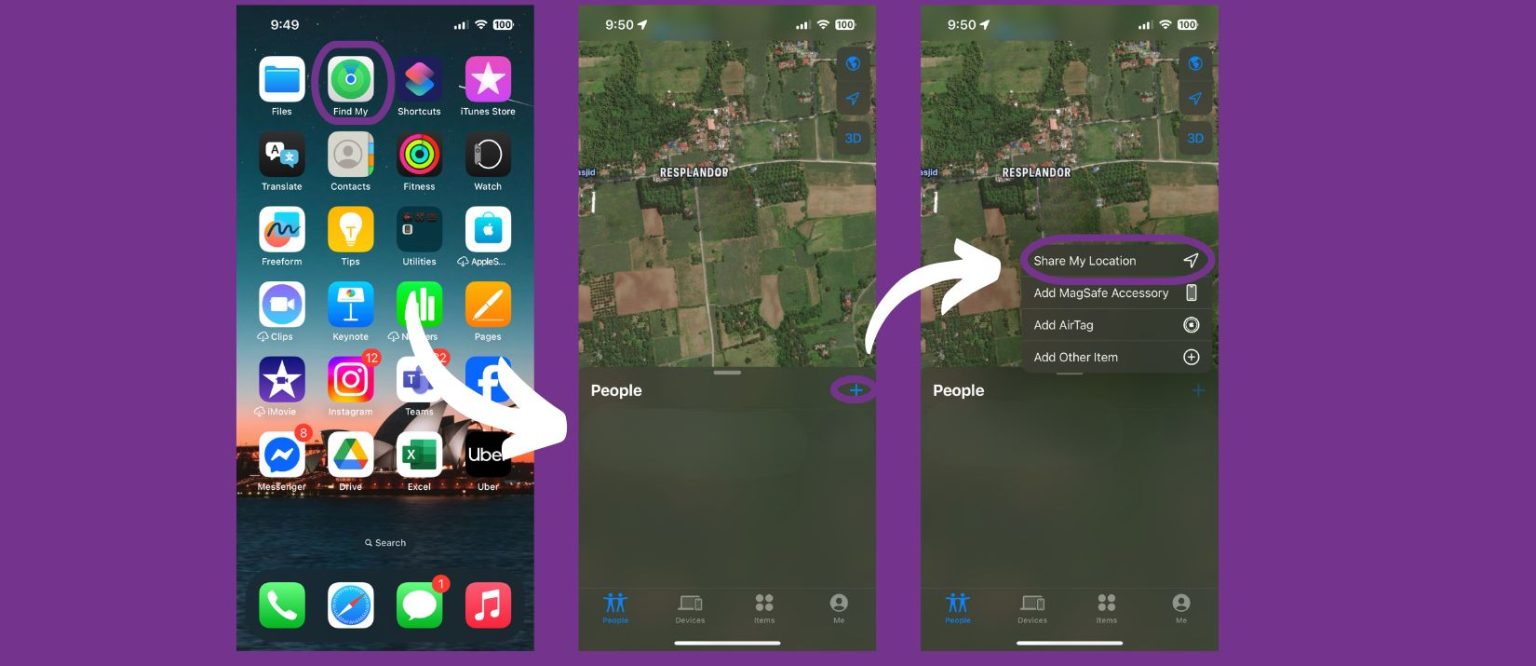
>Open the Find My app
>Tap on People at the bottom
>Tap + Share My Location
>Enter contact’s name, number, or Apple ID
>Choose duration: 1 hour, until end of day, or indefinitely
3. Share Location via iMessage
(Best for: spontaneous meetups and quick updates)
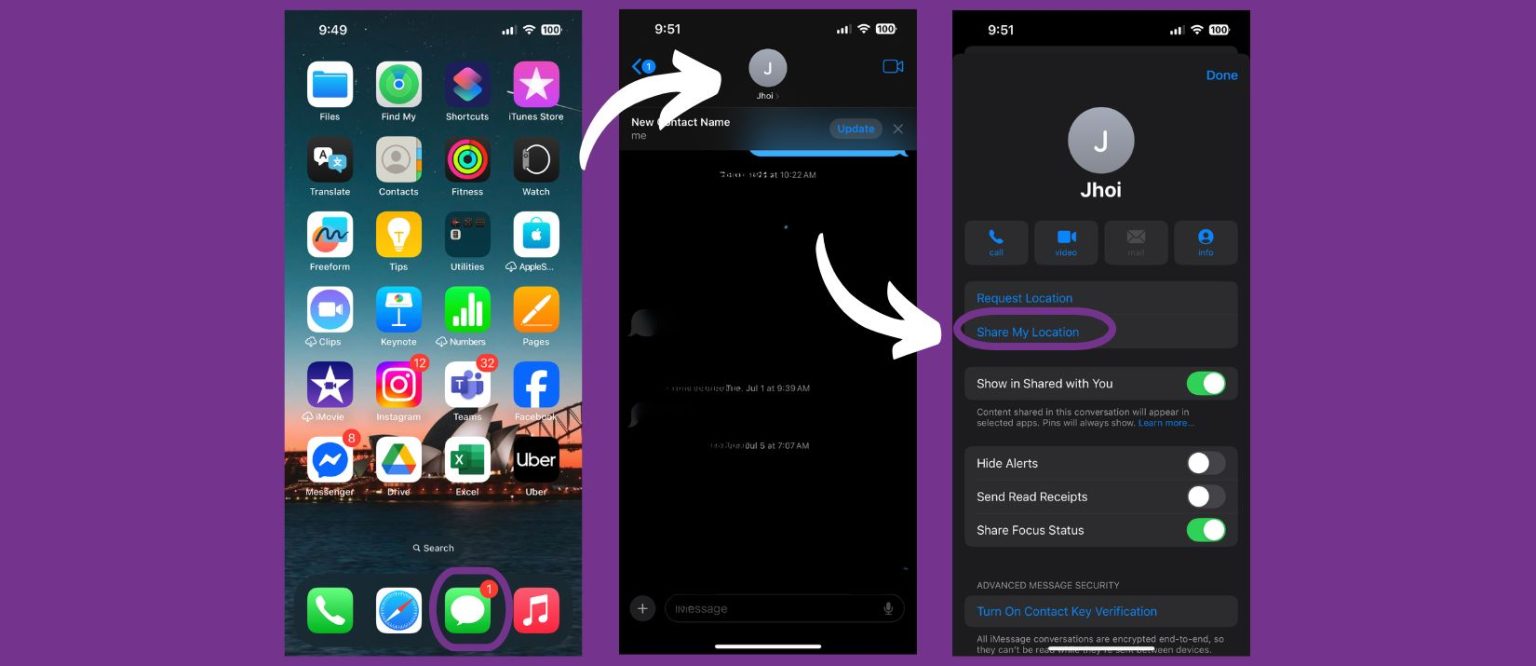
>Open a conversation in Messages
>Tap the contact’s name at the top
>Select Share My Location or Send My Current Location
>Choose duration if sharing live
Traveling is about discovery, new places, new people, new memories. But staying connected along the way shouldn’t be a hassle. With just a few taps on your iPhone and the power of Aerobile eSIM, you can effortlessly share your location while traveling, giving your loved ones peace of mind and making every trip smoother. So, whether you’re catching sunrise at the Grand Canyon or strolling the night markets of Taipei, you’ll never have to worry about losing touch. Go further. Explore deeper. Stay connected with Aerobile eSIM!
AEROBILE E-SIM
YOUR PARTNER IN EVERY TRIP!
Do you want to enjoy your trip? Share your experiences with your family and friends on social media without having problems with expensive roaming charges? WE GOT YOU!
Plan ahead! Order AEROBILE eSIM now and enjoy the following benefits it brings your way!
- Enjoy easy eSIM access that keep you connected without the hassle of traditional SIM cards.
- Provide budget-friendly plans
- Top-notch customer support
- The roaming service is all set up once you arrive on your destination!
Planning your trip can be stressful, but losing your internet connection is a total travel nightmare!
But with Aerobile eSIM by your side, just have fun and seize the moment with seamless connectivity wherever your travels take you.