You’ve just unboxed your shiny new iPhone 17 — and wow, what a beauty! With its lightning-fast A19 chip, next-level AI camera, and that elegant titanium finish, it’s no wonder Apple fans can’t stop talking about it. But before you dive into testing that incredible new camera or exploring the latest features, there’s one essential step you don’t want to overlook — learning how to transfer your eSIM to your new iPhone. Now, if you’re coming from an iPhone 15 or 16, or finally saying goodbye to your physical SIM card (welcome to the future!), don’t worry — the process is surprisingly simple. I’ve personally done this more times than I can count, and trust me, it’s quick and painless when you know the right steps.
Why eSIM Transfer Matters for iPhone 17 Users
Apple continues to lead the way in mobile innovation, and with the move to eSIM-only iPhones in the U.S. and Canada, managing your mobile data just got smarter and simpler. Forget fumbling with tiny SIM cards — this new era of digital connectivity lets you switch carriers in seconds, juggle multiple data plans with ease, and stay connected wherever your travels take you.
From my own experience using Aerobile eSIM while hopping between countries, I can tell you — having your eSIM transferred smoothly is a total game-changer. No downtime, no frantic Wi-Fi searches at the airport, and definitely no waiting for a courier to deliver a new SIM card.
When you transfer your eSIM to another iPhone, especially the new iPhone 17, you’ll enjoy:
- Seamless connectivity as you upgrade your device
- Zero interruptions when traveling across borders
- Instant access to international data plans — no physical SIM required
In short, your phone stays connected, your data plan remains active, and your adventures never skip a beat. Whether you’re catching a flight, exploring new cities, or simply upgrading your tech, making sure your eSIM transfer is done right keeps you effortlessly connected to the world.
Step-by-Step: How to Transfer eSIM to Other iPhone (iPhone 17 Edition)
"Option 1: Automatic Transfer Using Quick Start"
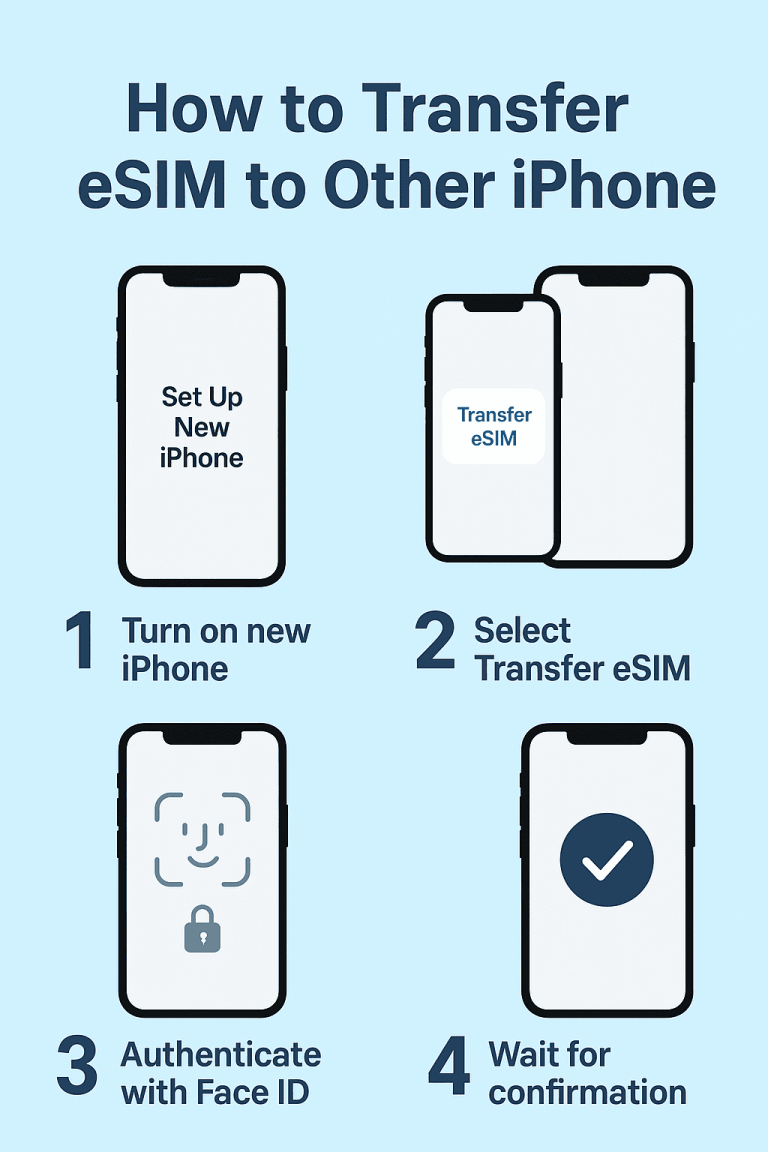
This method is ideal if both your old and new iPhones are nearby.
- Turn on your new iPhone 17 or your any other iPhone device and place it close to your old iPhone.
- When prompted, select “Set Up New iPhone” on your old device.
- Choose “Transfer eSIM” when it appears on screen.
- Follow the authentication steps using your Face ID or passcode.
Wait for the transfer confirmation message — your eSIM is now active on the new iPhone 17.
"Option 2: Manual Transfer via QR"
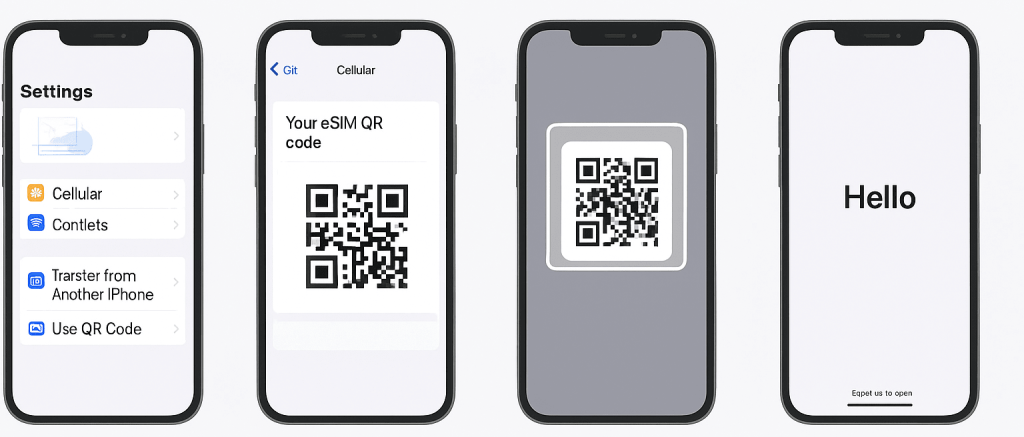
If you no longer have your old phone or prefer a manual setup, use this option.
- 1On your new iPhone 17, go to Settings → Cellular → Add eSIM.
- Choose “Transfer from Another iPhone” or “Use QR Code.”
- Log in to your Aerobile account or open your activation email to access your eSIM QR code.
- Scan the QR code using your iPhone 17’s camera.
- Follow on-screen steps to complete activation.
- Restart your device to finalize the setup
Upgrading doesn’t mean you have to stress about staying connected. If you’re wondering how to transfer eSIM to other iPhone models without the hassle, Aerobile eSIM makes the whole process feel like a breeze. From my own experience hopping between devices while traveling, Aerobile eSIM has been a total game-changer. The transfer to my iPhone 17 was quick, secure, and honestly… kind of satisfying. No fiddling with tiny SIM trays, no surprise costs, and absolutely no downtime. Just a smooth, reliable eSIM transfer iPhone 17 users can count on. Whether you’re exploring new countries or simply upgrading your tech, Aerobile eSIM keeps your connection ready the moment you are. Just pure convenience which exactly when you need it most.
AEROBILE E-SIM
YOUR PARTNER IN EVERY TRIP!
Do you want to enjoy your trip? Share your experiences with your family and friends on social media without having problems with expensive roaming charges? WE GOT YOU!
Plan ahead! Order AEROBILE eSIM now and enjoy the following benefits it brings your way!
- Enjoy easy eSIM access that keep you connected without the hassle of traditional SIM cards.
- Provide budget-friendly plans
- Top-notch customer support
- The roaming service is all set up once you arrive on your destination!
Planning your trip can be stressful, but losing your internet connection is a total travel nightmare!
But with Aerobile eSIM by your side, just have fun and seize the moment with seamless connectivity wherever your travels take you.